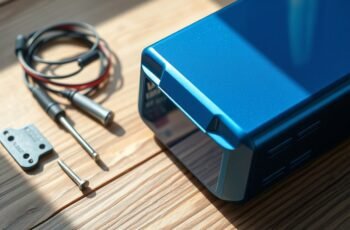
Imagine a scenario where a lithium battery’s performance suddenly drops due to unnoticed corrosion on its terminals. Proper cleaning techniques are vital to restore peak function and prevent long-term damage. To guarantee reliable operation, understanding the proper procedures and precautions is imperative. We’ll explore the most effective methods to identify, clean, and maintain battery terminals, helping you avoid common pitfalls and extend the lifespan of your lithium batteries.
Key Takeaways
- Disconnect the lithium battery and wear insulated gloves before cleaning.
- Use a non-metallic brush with a baking soda and water solution to remove corrosion.
- Rinse with distilled water and dry thoroughly to prevent moisture buildup.
- Apply a dielectric grease or terminal protector to prevent future corrosion.
- Regularly inspect terminals for signs of corrosion or dirt and clean as needed.
How to Identify Corrosion and Dirt on Battery Terminals
Corrosion and dirt on battery terminals can considerably impair electrical connectivity and overall battery performance. Visual inspection is vital for identifying these issues. Look for whitish, bluish, or greenish deposits around the terminal posts, which indicate corrosion. Additionally, a buildup of dirt or grime may obscure the metal contact surfaces. Corrosion directly impacts battery life by increasing electrical resistance, leading to inefficient power transfer and potential system failures. Regularly inspecting terminals helps detect early signs of corrosion, enabling timely corrosion prevention measures. Maintaining clean terminals preserves ideal electrical contact, prolongs battery life, and guarantees reliable operation. Precise identification of corrosion and dirt enables effective maintenance, safeguarding your battery’s performance and minimizing the risk of unexpected failures.
Essential Tools and Supplies for Cleaning Lithium Battery Terminals
To effectively clean lithium battery terminals, we need to gather the appropriate tools and supplies designed for safe and thorough maintenance. Essential tools include insulated gloves, safety goggles, and a non-metallic brush or toothbrush for abrasive cleaning. Supplies should consist of a mixture of baking soda and water or specialized battery terminal cleaner to neutralize corrosion. A clean, lint-free cloth is necessary for wiping residues. Ensuring battery safety is paramount; always disconnect the battery before cleaning and work in a well-ventilated area. Regular cleaning, based on the cleaning frequency, prevents corrosion buildup and maintains best performance. Using proper tools and supplies not only enhances cleaning efficiency but also minimizes risk to the user and prolongs battery life.
Step-by-Step Guide to Safely Cleaning Your Battery Terminals
Before beginning the cleaning process, make certain the vehicle or equipment is turned off and the battery is disconnected to prevent electrical hazards. Prioritize battery safety by wearing protective gloves and eye protection throughout the procedure. Start by inspecting the terminals for corrosion or buildup. Prepare a solution of baking soda and distilled water, then use a non-metallic brush or toothbrush to scrub the terminals gently, removing corrosion and preventing further buildup. Rinse with distilled water and dry thoroughly with a clean cloth. Once dry, apply a thin layer of dielectric grease or terminal protector to inhibit future corrosion. Proper cleaning and application of protective measures are essential for corrosion prevention and maintaining ideal electrical connectivity. Always follow manufacturer guidelines for lithium battery handling.
Troubleshooting Common Issues After Cleaning
After completing the cleaning process, we may encounter issues such as poor electrical connection or intermittent power, which can compromise device performance. In such cases, initial troubleshooting should involve thorough charging system diagnostics to identify voltage irregularities or circuit faults. If cleaning has failed to restore proper contact, a battery terminal replacement might be necessary to guarantee a secure, corrosion-free connection. Confirm that the terminals are properly seated and free of residual debris or corrosion residues. Persistent issues could also stem from damaged wiring or connectors, requiring further inspection. Regular testing with a multimeter helps verify voltage stability. Addressing these problems promptly prevents long-term damage and ensures ideal device operation, emphasizing the importance of precise diagnostics and appropriate component replacement.
Tips for Maintaining Clean Battery Terminals Over Time
Maintaining clean battery terminals over time requires consistent attention and proper techniques to prevent corrosion buildup and guarantee reliable electrical contact. Regular inspection is essential to identify early signs of oxidation or debris, which can impair conductivity. Applying a protective coating or terminal anti-corrosion spray can inhibit corrosive processes, extending battery lifespan. Confirming tight, secure connections minimizes resistance, thereby improving charging efficiency. Avoiding exposure to moisture and contaminants preserves terminal integrity and prevents premature degradation. Routine cleaning with appropriate tools and solutions maintains ideal contact surfaces, reducing the risk of voltage drops or electrical faults. Consistent maintenance not only prolongs the battery’s functional life but also ensures maximum charging efficiency, ultimately enhancing overall system reliability.
Frequently Asked Questions
Can I Use Household Cleaning Products on Lithium Battery Terminals?
You shouldn’t use household cleaning products on lithium battery terminals due to chemical safety concerns; they can cause damage or corrosion. We recommend specifically designed contact cleaners to guarantee proper maintenance and avoid potential hazards.
How Often Should I Clean Lithium Battery Terminals?
We suggest inspecting battery terminals and maintaining charging connections every three to six months. Regular cleaning prevents corrosion, guarantees peak conductivity, and prolongs battery lifespan, making scheduled maintenance essential for reliable lithium battery performance.
Are There Specific Safety Precautions for Lithium Batteries?
Did you know improper handling causes 80% of lithium battery fires? We emphasize rigorous safety precautions, including proper battery disposal and charging safety, to prevent hazards. Always follow manufacturer guidelines for safe lithium battery management.
What Are the Signs of Terminal Damage Beyond Corrosion?
We observe terminal discoloration or unusual heat during operation, which signals potential internal damage beyond corrosion. These signs indicate compromised integrity, requiring immediate inspection and possible replacement to guarantee safety and peak battery performance.
Can Cleaning Improve Battery Performance or Lifespan?
While some may doubt cleaning’s impact, proper battery maintenance reduces terminal corrosion, directly enhancing performance and extending lifespan. Regular cleaning prevents buildup, maintains efficient connections, and guarantees ideal energy flow, ultimately improving battery reliability and longevity.
Conclusion
By diligently detecting dirt and corrosion, we guarantee our batteries perform perfectly and last longer. Properly preparing, cleaning, and protecting terminals prevents problems before they start, promoting peak performance and peace of mind. Consistent care cultivates connection clarity, curbing corrosion and corrosion-related concerns. With meticulous maintenance, we maximize battery lifespan and ensure reliable power, reinforcing resilience and readiness in every application. Proper protocol and persistent prevention pave the path to prolonged, problem-free power.